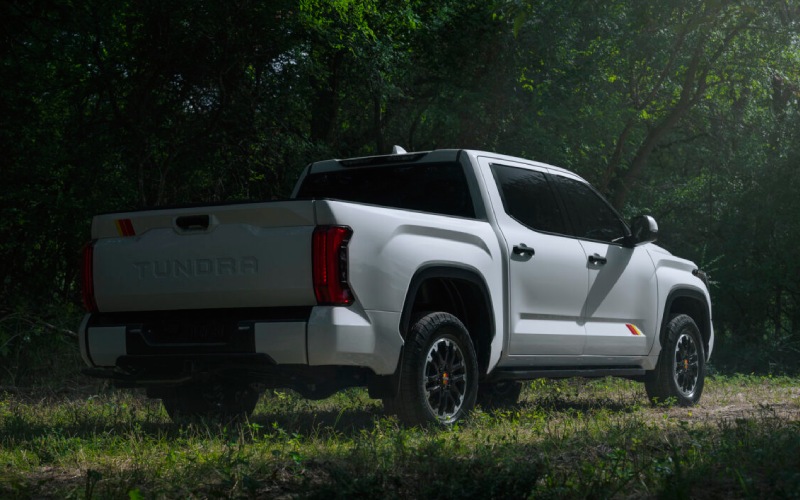
Toyota of Kirkland - Easier Parking and Smarter Towing with the 2026 Toyota Tundra Around Kirkland, WA
If you have ever tried to thread a full-size truck through a compact parking garage or line up a trailer at a busy launch, you know that vision and control mean everything. That is exactly why the 2026 Toyota Tundra’s available Panoramic View Monitor and Trailer Backup Guide with Straight Path Assist are such difference-makers for drivers around Kirkland, WA. These are not party tricks—they are practical tools that make everyday maneuvering more intuitive, whether you are backing down a narrow driveway, clearing a curb near a crowded trailhead, or guiding a boat toward the water at Marina Park.
What stands out is how seamlessly these systems work together. The Panoramic View Monitor stitches images from cameras at the front, sides, and rear to give you a 360-degree perspective that helps you gauge obstacles you could not otherwise see from the driver’s seat. Trailer Backup Guide with Straight Path Assist reads the trailer angle and input to help you keep everything aligned, lowering stress when space is tight or a crowd is watching. It is like having a spotter along every time—without the yelling or guesswork.
Why Vision Tech Matters for Full-Size Trucks
Trucks are built wide and tall for good reasons—strength, stability, and cargo capacity—but that also means visibility can be challenging in urban and suburban settings. The Tundra’s available Panoramic View Monitor takes away that anxiety by showing you what is around the truck at low speeds, from curbs and parking blocks to tight corners that could otherwise surprise you. Combined with the available 12.3-in. Digital Gauge Cluster and the available 14-in. Toyota Audio Multimedia touchscreen, you see what matters clearly and in the right place.
With Trailer Backup Guide and Straight Path Assist, the Tundra brings next-level confidence to weekend adventures and weekday errands. Sensors and cameras cooperate to monitor trailer angle, and the system can help you keep a steady path while reversing—especially useful when you are threading a cargo trailer toward a storage space or lining up a small boat under pressure at the ramp.
How Panoramic View Monitor Works
The system uses cameras mounted at the front, sides, and rear to present a composite view. At parking-lot speeds, you can toggle perspectives to see a simulated bird’s-eye image, a curb-view to avoid wheel rash, or a forward view that helps you ease up to an obstacle precisely. It works naturally because it is integrated into the Tundra’s available large-format touchscreen—no juggling aftermarket apps or awkward displays.
In tight Kirkland, WA, lots or side streets with limited shoulder, the Panoramic View Monitor helps you place the truck with confidence. It can save time and help prevent small mishaps that interrupt your day, making the Tundra feel smaller on the outside while preserving its capability where it counts.
Backing Up With a Trailer: Straight Path Confidence
Anyone who has tried to reverse a trailer knows that small corrections at the wheel can cause big swings at the hitch. The available Trailer Backup Guide with Straight Path Assist helps simplify that dance. As you begin backing up, the system tracks the trailer’s angle relative to the truck and can assist you in maintaining a straight line, reducing the back-and-forth corrections that usually come with practice.
Paired with the Panoramic View Monitor’s rear camera views and guidelines, you gain visual clarity plus guidance. You will still want to take it slow and stay alert—that is true with any driver-assistance feature—but the tech helps flatten the learning curve so you can get on with your day.
Real-World Scenarios Around Town
Think about a Saturday at the lake: you arrive at the ramp, onlookers abound, and the cross-breeze has a mind of its own. With the Tundra’s Trailer Backup Guide with Straight Path Assist, you can start your reverse with more composure. Or consider navigating a tightly packed downtown lot—PVM helps you slip into a space without drama.
The Tundra’s multi-link rear suspension with coil springs also plays a quiet supporting role here. It helps keep the truck stable under load and composed over uneven pavement, which makes camera views steadier and small corrections easier to control during low-speed maneuvers.
Quick Setup Tips for Trailer Tech
- Check connections: Confirm the trailer is properly hitched, with electrical and safety connections secured.
- Verify camera views: Ensure the rear camera is clear of dirt and water spots for the best image quality.
- Select the right view: Use the on-screen options to toggle perspectives that best suit your angle and space.
- Back up slowly: Give the system time to interpret the trailer angle and help with straighter tracking.
- Stay situationally aware: Mirrors and sight lines still matter; tech is a helper, not a substitute.
These steps help the truck’s assistance features do their best work. The payoff is a more relaxed approach to jobs that used to feel tense.
Which Trims and Packages Offer These Features?
Panoramic View Monitor and Trailer Backup Guide with Straight Path Assist are available on select grades and packages. If you are cross-shopping Tundra trims, ask about availability alongside other must-haves like the available 12.3-in. Digital Gauge Cluster, 14-in. Toyota Audio Multimedia touchscreen and integrated towing hardware. If you plan to tow larger loads frequently, consider the available i-FORCE MAX hybrid powertrain for its 583 lb.-ft. of torque and confident low-end response—it makes moving weight less strenuous and complements the trailer tech nicely.
Towing stability also benefited from the Tundra’s strong frame and suspension tuning. This helps the cameras and guidance features shine by giving you a predictable platform to work from, especially on ramps with imperfect surfaces or angled approach lanes.
Frequently Asked Questions:
Do I still need practice if the Tundra has Trailer Backup Guide?
Yes. The system assists with straight-path backing, but smooth inputs and situational awareness are always essential. Practice in an open lot to build confidence before busy environments.
Is the Panoramic View Monitor useful without towing?
Absolutely. From parallel parking to avoiding curb rash on tight turns, the 360-degree perspective can simplify everyday driving tasks in busy areas.
Does the system work with any trailer?
It is designed to support a broad range of conventional trailer types. For best results, ensure proper hitching and that your trailer’s size and weight align with your Tundra’s configuration and ratings.
How does Toyota Safety Sense™ 2.5 fit in?
It adds driver-assistance systems that support confident driving beyond parking and trailering, helping with awareness on highways and local streets alike.
When you put it all together—clear camera views, smart trailer guidance, and a stable, powerful platform—the 2026 Tundra feels easy to live with in places where large trucks used to feel out of their element. If you are exploring builds that pair vision tech with towing strength, the Tundra’s available i-FORCE MAX hybrid brings serious thrust to the equation. The result is calmer maneuvering plus power in reserve when you need it.
Ready to see how it all works in the real world? Toyota of Kirkland, serving Issaquah, Lynnwood, and Kirkland, can help you compare trims and take a hands-on look at the features that matter most to you. A quick demo in a tight lot or a practice run with a trailer can turn curiosity into confidence—so the next time a ramp is crowded or a garage feels snug, you will have the right tools and the right truck for the job.
Request more 2026 Toyota Tundra information
Categories:
Toyota Tundra